
Marvel Rivals Cheats Not Working: What to Check First
A troubleshooting checklist for Marvel Rivals cheats that fail to load, show nothing, or stop working, from game updates to settings mistakes.
When a cheat stops working, the cause is usually one of a few common things. Go through them in this order before you assume something is badly broken.
1. A game update just came out
This is the most common cause. After a Marvel Rivals patch, software that was working yesterday may not match the new version of the game. Check the current status of the product and wait for an update if needed. Launching it anyway is not worth the risk.
2. You are running an outdated version
Make sure you have the latest version of the software. An old copy can fail even when the game itself has not changed in a way you noticed.
3. Security software is interfering
Antivirus and similar tools sometimes block or quarantine files from software like this. Check whether anything has been removed or blocked, and follow the setup instructions that came with your purchase for how to handle it.
4. Setup steps were skipped
Go back to the instructions and confirm you completed each step in order. Many problems come from a missed step, such as launching things in the wrong sequence.
5. A setting is working against you
If a feature seems to do nothing, check its settings before assuming it is broken:
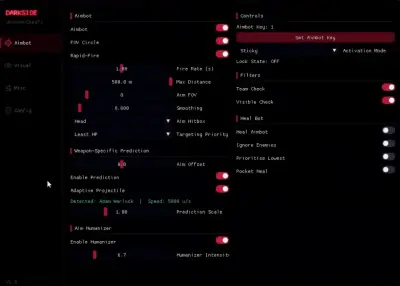
- Aimbot not aiming. Confirm an aim key is assigned and that the field of view is not set too small. If the visibility check is on, it will ignore anyone you cannot see. See aimbot settings for how each option behaves.
- ESP not showing. Make sure it is switched on, that the colors are visible against the background, and that the distance setting is not too short. The ESP setup guide covers each option.
6. Your system does not meet the requirements
Check the compatibility notes on the product page and confirm your Windows version matches.
7. Contact support
If none of the above helps, gather the details: what you did, what you saw, and any error message. Then contact support using the channels listed on the Marvel Rivals cheats page. Clear details get you a faster answer.
A note on risk
Do not keep using a tool that is behaving oddly in a live match. If you are unsure about its status, wait. Our guide to detection and updates explains why.